Sometime, you wanna check or preview some data from subversion directly.
but it couldn’t show correctly, cause it’s Mime-type defined “text” or “binary”.
At times like that, you can change Mime-type on subversion.
below is example for Tortoise SVN for Windows.
- Select file you wanna change, and open context menu on file explorer.
- Access “Properties” in tortoise sub menu
- Properties dialog will open.
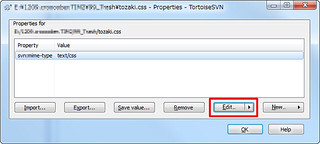
- Click “Edit”, then Mime setting dialog will open.
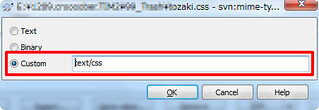
- Input Mime-type you wanna set and commit.
- That’s done! good developing!