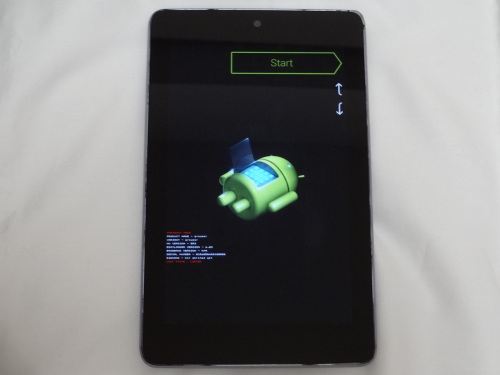
3年前に購入したLenovo Yoga Smart Tab (ZA3V0052JP)をハードリセットするにあたり迷走したのでメモ。
みなさん、本当にありがとうございます。
価格.com – 『初期化』 Lenovo Yoga Smart Tab ZA3V0052JP のクチコミ掲示板
メーカーにLINEをして解決できました。
親身になって頂きありがとうございます。
おうおう、その解決方法をここに共有せんのかい!?インターネットに期待するオープンな情報共有という概念は時代遅れの老害概念なのかー😨
3年前に購入したLenovo Yoga Smart Tab (ZA3V0052JP)をハードリセットするにあたり迷走したのでメモ。
みなさん、本当にありがとうございます。
価格.com – 『初期化』 Lenovo Yoga Smart Tab ZA3V0052JP のクチコミ掲示板
メーカーにLINEをして解決できました。
親身になって頂きありがとうございます。
おうおう、その解決方法をここに共有せんのかい!?インターネットに期待するオープンな情報共有という概念は時代遅れの老害概念なのかー😨
2015/1頃のお話・・・、その時は以下の方法を試してみました。
最初は軽快だったんですが、しばらくするとやはり重たくなって使えない。
(タッチパネルの待機ストレスは、マウスのそれを遥かに超えますな)
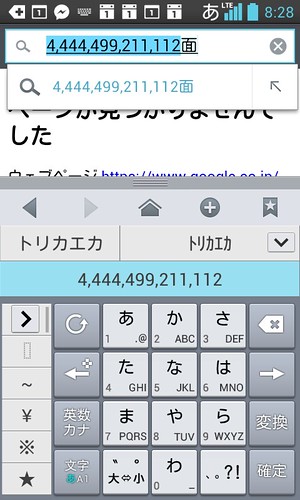
Android(L-05D)で調べ物中に「とりかえ」という文字を変換していた時のこと。
変換候補に
「444,449,921,111」
「444449921111」
という謎めいた数字の候補が出現。
調べてみたけどヒットせず。
なんだろうこれは・・・?
暗号?知ってはいけない秘密?
信じるか、信じないかはあなた次第です的なやつ?
あなたのAndroidはどうですか?
実機のバーチャルデバイスを作ってみる。
Sony Ericsson Xperia™ X10(API level10)※最新版
1)SDKのダウンロード
Developer World – Download – Downloads – Devworld – Sony Ericsson Xperia™ X10 add-on for the Android SDKからSDKのZIPデータをDL。Zipを展開すると中に”XPERIA-X10_r1″が出てくるので、それをAndroid SDKの入っているディレクトリの中の”add-ons”以下に配置。ここでDLできるのはAPI level10のもの)
2)AVD作成
Eclipse起動してAVD Manager起動してAVD新規作成。TargetでSony Erricsonのモノを選択。(名前はコロコロ変わる。今回はEDK1.2でAPIレベル10)Hardwareなどは既に設定されているので、NameとSD Cardだけ入力して保存+起動。これでXperiaのバーチャルデバイスが起動する。(筐体、起動や壁紙とかもXperiaになる)
過去のExperia(API level4)
1)EclipseからAndroid SDK Manager起動
2)[Tools/Manage add-on sites]を選択して
http://dl-www.sonyericsson.com/cws/download/1/992/031/1315461842/EDK_1_1_repository.xml
を追加。
3)SDK Managerの”Android1.6 API Level4”にX10のSDKが現れるのでそれをインストール。(要Android SDK1.6インストール)※Xperiaは以前に別でインストールしていたので、その設定が残っているかもしれないので同じ挙動になるか不明。
GalayxTabのSDKインストール
1)SDK Managerでサムソンのリポジトリ登録
http://innovator.samsungmobile.com/android/repository/srepository.xml
これでAndroid2.2 API8のSDKが選択できるようになる。
2)Android2.2と共にインストールして、AVD設定すればOK。
備忘録的に・・・(※2012年1月時点の話なのでその辺注意)
環境はWin7(64bit)
1)JDKのインストール
JDKとかJREとかグチャグチャな感じになっていたので一度整理して再インストール
Java SE Downloads
JDK6,JDK7それぞれ32bit,64bit4つ入れておく
2)Eclipseのインストール
Eclipse Downloads
Flash Builderでも良いのだろうが、混乱しそうなのでEclipseで。パッケージは”Eclips IDE for Java Developers 64bit”。コードネームは”Indigo”。
日本語化したEclipseをDLしたい場合はPleiades – Eclipse プラグイン日本語化プラグインという選択肢もあり。(64bitなのか32bitなのかよく分からないけれど)
We use cookies to improve your experience on our site. By using our site, you consent to cookies.
Manage your cookie preferences below:
Essential cookies enable basic functions and are necessary for the proper function of the website.
These cookies are needed for adding comments on this website.
Google reCAPTCHA helps protect websites from spam and abuse by verifying user interactions through challenges.
Google Tag Manager simplifies the management of marketing tags on your website without code changes.
Statistics cookies collect information anonymously. This information helps us understand how visitors use our website.
Google Analytics is a powerful tool that tracks and analyzes website traffic for informed marketing decisions.
Service URL: policies.google.com (opens in a new window)
Marketing cookies are used to follow visitors to websites. The intention is to show ads that are relevant and engaging to the individual user.
A video-sharing platform for users to upload, view, and share videos across various genres and topics.
Service URL: www.youtube.com (opens in a new window)
You can find more information in our Cookie Policy and Privacy policy.